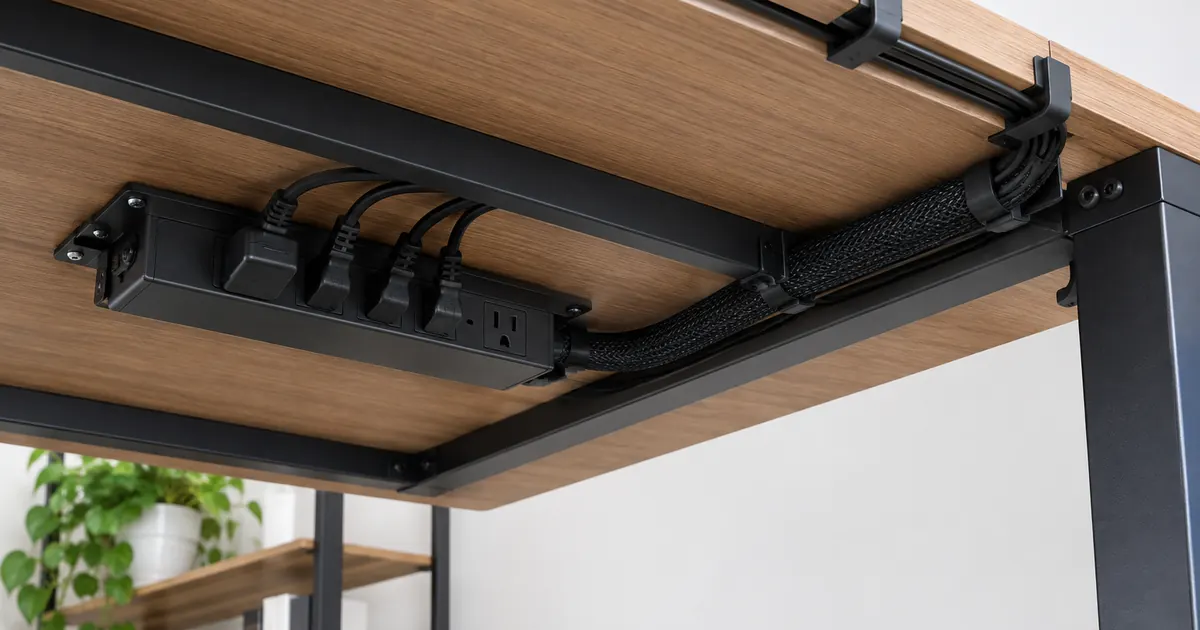
The Clean Desk Setup: Cable Management That Actually Lasts
Every cable management attempt starts the same way: a roll of velcro, an afternoon, a desk that looks brand new. And most of them fail the same way too — three weeks later there is a snake of cables behind the desk again, because the system fought the way the desk is actually used. The fix is not more velcro. It is designing the setup so cables never cross the desktop in the first place.
Principle 1: The Monitor Arm Is the Cable Highway
The biggest desk clutter source is the run from monitor to desk edge — power and video cables draping over the work surface. A monitor arm with integrated cable routing channels solves this structurally: cables clip into the arm's spine, travel along it, and drop behind the desk at the clamp. Nothing touches the desktop.
If your arm is already mounted, you can retrofit the same idea with adhesive cable clips along the arm and desk underside. But if you are choosing an arm now, integrated routing is worth prioritizing — see the monitor arms with built-in channels.
Principle 2: Anchor Everything Under the Desk
The space under the desktop is your distribution center. Power strips get mounted to the underside of the desk — never left on the floor where they collect dust and get kicked. Screw a strip of cable raceway or even a simple wire basket under the desk's rear edge, and every cable that drops from an arm or a device terminates there.
Keep three cable lengths in play: short enough that there is no slack loop hanging below the desk, long enough that drawers and height adjustments never tug a connection. For standing desks, add a service loop — a deliberate slack coil that lets the desk rise and fall without straining any cable.
Principle 3: Stop the Small-Cable Chaos
USB, charging, and peripheral cables are worse than power cables because they move constantly. Two tools solve them:
- Magnetic cable clips hold a cable at the desktop edge so it is always reachable but never on the floor. The silicone magnetic cable clips grip the cable, stick to the desk, and let the cable pull free when you actually need it.
- One cable per direction. Anything that crosses the desktop gets a clip at both ends. Anything that does not cross the desktop does not exist on top of it.
Principle 4: Fill the Grommet (or Make One)
If your desk has a grommet hole, it is the perfect single point where all cables drop from desktop to under-desk — that is exactly what it is for. No grommet? A grommet conversion kit adds a clean 2.5-inch pass-through anywhere on the desk, no drilling jig required. It is the single highest-impact ten-dollar upgrade for a messy desk.
Principle 5: Multi-Monitor Setups Need a Plan, Not More Velcro
Two or three screens triple the cable count, which is why multi-monitor desks collapse into spaghetti faster than any other setup. A multi-monitor stand halves the problem before you tie a single strap: one base, one cable route, arms that channel cables to a single drop point. Route each screen's cables along its arm, join them at the center pole, and drop one bundle behind the desk.
The 20-Minute Maintenance Loop
Even good systems drift. Once a month: unclip the under-desk basket, pull the tangle loose, re-seat each cable with a label tag, and re-close. Twenty minutes, once a month, and the desk stays in the photo-worthy state you built it in.
Standing Desks: The Extra Loop
If your desk moves up and down, cable management has one extra job: everything between the desktop and the floor needs to stretch, or your beautiful routing strangles itself the first time you press "rise." The standard solution is a service loop — extra cable length coiled and zip-tied into a loose loop that lets the desk travel its full range. Route power and video through the loop at the desk's center rear edge where travel is most vertical, and anchor the power strip to the desk itself (not the floor) so the whole under-desk system rises and falls together. Monitor arm cable channels earn their keep twice here: the arm moves with the desk, so cables routed through it never feel the travel at all.
The One-Hour Clean Desk Blueprint
Putting it all together for a typical two-monitor desk: mount the multi-monitor stand or arms first (20 minutes). Route each screen's cables along the arms to the center drop point (5 minutes). Mount the power strip under the rear edge and plug everything in with the shortest cables that reach (10 minutes). Add magnetic clips at the desktop edge for anything you unplug weekly (2 minutes). Fill the grommet or add a conversion kit as the single pass-through (10 minutes). Label both ends of anything you are unlikely to touch for a year (5 minutes). One hour, once — and the desk stays clean because nothing has to be unplugged to work on it.
A clean desk is not about discipline — it is about hardware that makes clean the default. Start with the desk accessories collection: clips, grommets, and adapters that turn a cable problem into a routing problem, and routing problems always have a solution.